Help me to help you
By buying a cert together Adito will be alive much longer!
Please see this post to understand and how to donate!
Warning: This version is based on original binary release and contains several bugs. Please use the SVN version instead!
The installer uses the NSIS-installer, thanks a lot for this guys!
Requirements
- Java Runtime Enviroment v1.7.0 or older! (Note that Java v1.8.0 is not supported)
Read changes needed for version Java v1.7.0!
- 25-30MB of space
-
Little network & config knowledge
Download installer
- Version 0.9.1 (alternative: zip)
Note: The installer contains tools.jar so the required JDK isn’t needed for installation. Pretty stupid with a 65MB installation just to get this 12MB file
If you are looking for the Adito SVN-version, download here
Step-by-step guides
For the guide on how to install it, read below!
For a guide to set up RDP to your Adito server, check here
Download NSIS Installerscript – developers only
I finally got around to release the OpenVPN-ALS (Adito) installerscript!
Download it here (21,6MB)
If you are use the Installer script, here is the deal:
* I want to be credited, linked back here…
* You publish the new installer web references here!
* I’ll add it to the page so others can play around with your release!
That would be great for the community, and probably fix a bug or two for those who problems installing this 🙂
Usage:
- Download & Install NSIS
-
Extract “Includes to NSIS.rar” to %programfiles%NSISInclude
-
Use a decent NSIS Editor, like HM NIS Edit (It does have a simple, but good, IDE!)
-
Play around in the AditoInstaller.nsi file to see what it does
Don’t cry when you mess up, redo!
Troubleshooting
I don’t know anything at the moment, use the comments-field
Uninstaller
It will remove EVERYTHING! Please use with caution especially after you customize.
Reinstall
I have successfully reinstalled above the old version without problems so if you are upgrading, stop the service/console and just install above the old one.
Also check out this wiki on how to make a copy of your config
Step-by-step information
- Welcome screen

- License and information regarding licenses

- Java-check, this will look for register-entries regarding the JRE and notify you if you don’t have java-installed.

- The destination path for the installation

- Status-progress of the file copying
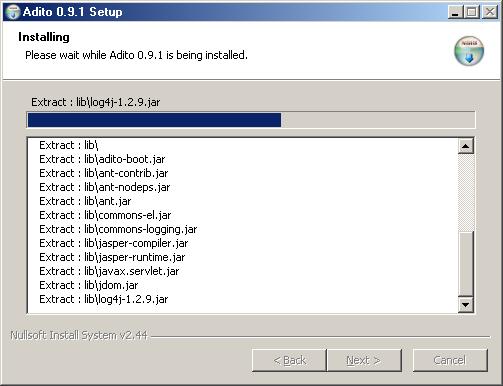
- Webconfiguration of Adito (Now called OpenVPN ALS), please read!

After starting this configuration you will have a command-prompt that again will open a browser window with the config. Here is the command-prompt running the config
The browser should lead you to this page
Run through the wizard it should be easy to understand. Questions regarding the config, use the Adito (OpenVPN ALS) Wiki


- Run adito (OpenVPN ALS) as service is the most common way. The example shows that it doesn’t install it as service but that is just to show the next frame 😉

- Run in console fires up the Adito (OpenVPN ALS) in a command-prompt

- Finished!


Thanks you very much!
Hi Lars,
Do you have any idea to increase session timeout inactivity for web forwarding ?
Actually idle session are closed after 5 minutes
Hi Lars
First thank you for this soft, i use it for a long time now.
Today since Java 8 we are not able to use Adito anymore. So i uninstalled JAVA 8 et reinstalled JaVA 7 on server and client.
But it doesn’t work anymore and i have 80 employees who cannot connect to their remote server.
If you find a solution for the JAVA 8 issue, it would be great, please inform us 😉
Regards, Franck
Hi Franck,
As stated before, never use Adito in production! 🙂
I’ll let everyone know if I’m able to get Adito to run on Java 8, I have trouble recompiling it. So it will takes some time.
Regards. Lars
Hi a nob here just got my self to learn a thing or two about vpn and stuck here (what a great idea Adito) and by all means a great job by you for the installer 🙂
Any way my problem looks like this (will try a few things by my self)
HTTP ERROR: 500
Unable to compile class for JSP
Generated servlet error:
C:\Program Files\Adito SVN R706\tmp\org\apache\jsp\WEB_002dINF\jsp\layouts\layout_jsp.java:7: cannot access java.lang.Object
Generated servlet error:
bad class file: java\lang\Object.class(java\lang:Object.class)
class file has wrong version 52.0, should be 50.0
Please remove or make sure it appears in the correct subdirectory of the classpath.
public final class layout_jsp extends org.apache.jasper.runtime.HttpJspBase
^
Any help would be much appreciated
Ps Java 8 installed not 7 will try to change that !
Hi,
This issue is directly related to Java 8 and their security changes in that version.
For now; Adito only works with Java 7.
I have tried to recompile with ant on java 8 without any love from java.
Still investigating what causes the error, but I cannot manage to get it running myself.
New version will be released when fixed.
Regards. Lars
Hi Lars,
first of all, imho you did a great work, cause Adito is really incredible idea
and I would be very sad if there is no way to use it under windows server 🙂
Anyway, I would want to use it under Win2008R2 I get this error when Adito service try to start :
Log Name: System
Source: Service Control Manager
Date: 4/15/2013 11:44:34 PM
Event ID: 7034
Task Category: None
Level: Error
Keywords: Classic
User: N/A
Description:
The Adito service terminated unexpectedly. It has done this 1 time(s).
Event Xml:
7034
0
2
0
0
0x8080000000000000
12204
System
appsrv.s2e-sparkle.lab.local
Adito
1
Can you help me ?
Thanks
Federico
Hi Frederico,
First of all: I didn’t create Adito.
I created the installer for Windows for more easy implementation.
I have not any experience running Adito on Win2k8, but here are some tips that you should check:
1. Check that you have the 32-bits version of Java-installed and that it has setup the PATH for it (reboot required). Meaning that you should be able to run java.exe from anywhere in the console. “Java.exe -version” should provide the info you need.
2. Run the installer as Administrator or with admin-rights.
3. Use the “Run with java” option from the start-menu if the service fails.
4. Then try to run it with the launcher, if that fails paste the start of the error here.
I’ll probably will setup an VM to check W2k8 one day, but as for now this is theory 😉
Regards. Lars
Hi Lars,
yes I know you did not create Adito 🙂
I wanted to say about windows installer anyway.
Now :
– 1 yes, is 32 bit version and path is ok
– 2 yes installed like Admin
– 3 Run with java gives no error :
C:\Program Files (x86)\Adito>RunWithJava.bat
Starting Adito (press CTRL-C or close window to terminate)
Stop Adito-service if you are checking for errors…
Press any key to continue . . .
But also I don’t see nothing listening on 443 port and also
doing a https://localhost, of course, I don’t reach configuration web page
Any other hint ?
Is here some user who ruled installation under Win2008R2 ?
Many thanks
Regards
Federico
Hi Frederico,
In command prompt use the command “netstat -aon” to check if the port is actually opened.
If you see something like this, a port is open:
Proto Local Address Foreign Address State PID
TCP 0.0.0.0:443 0.0.0.0:0 LISTENING 1040
If it is running open the firewall to that port: http://community.spiceworks.com/how_to/show/2594-open-ports-in-windows-server-2008-r2
You can use the PID number and cross-check in task manager on which program that opened that port.
You can also start the installation procedure again and try to install Adito to another port, for instance 4443.
If it is running on that port it probably collide with IIS.
Let me know of you findings 🙂
Hi my friend,
unfortunately port is not used, installation goes and finishes fine
but no way to see adito listening on 443 port.
Running with java returns no error but also I cannot see adito listening on port 443.
🙁
thanks
Try to reinstall java jre (java.com) and reinstall Adito again on another port (above 1024, for instance 4443).
At the end select ONLY the adapter that has IPv4 support and remove the “all Interfaces”.
If that still doesn’t work I’ll setup a VM with W2k8 R2 and give you feedback about my findings 🙂
Hi Fedrico,
I’ve just installed successfully Adito on a Windows 2008 VM (Image, straight from M$: SW_DVD5_Windows_Svr_DC_Ent_Std_2008_English_x64_MLF_X14-26714.iso ).
W2k8 came fresh out-of-the-box through the easy-installer from VMware and I installed by right-clicking as administrator on Java and Adito.
Note: No roles or other objects was added
The protection-mode in Internet Explorer was a little pain.
You had to press “Add” on “safe sites” to ensure that you could run eg javascript (which is required).
The service installed correctly and started as expected.
I had to open the port 443 (in the firewall) to enable service for other computers.
The procedure is pretty much equal to any other Windows version I’ve installed Adito on, so I don’t see why it doesn’t work for you.
Did you try to installed on another port?
Cheers. Lars
Hi Lars,
sorry but I was away and I read your post/email now.
So glad to know that it works 🙂
In the meanwhile I tried to install on Ubuntu server 11.04 and I noticed
that at the end of web wizard there is a part “of startup” that I did not see
under Win2k8 and, for sure, was due to IE protection mode.
Ok, you are great !
Now, I don’t know if leave Ubuntu vm up & running with Adito or shut it down
and go back to Win.
In any case, thank you very very much.
Just a question : are you so skill also in web forward configuration over adito ?
Bye :))
Anyone get this to work in Server 2008 R2? When I run the installer it goes through all the steps but I never get the option to run as a service. After closing the web browser portion of the install the main installer window hangs. Any help appreciated.
Hi, could you provide some more info:
Windows 2008 server R2 is it 32 og 64-bit?
Have you installed JRE 7 32-bit (it is the default one on java.com)?
Do you run the installer as administrator?
When Adito installer web-installation part was finished, did you wait the seconds and press the “Exit installer” on the web page, or did you just close the browser?
I was able to get the installer to run properly, the problem was due to IE9 and was mentioned in some earlier comments.
The problem I am having now is that the Agent will not run on a Windows 7 x64 client. I found a reference to this problem in another discussion thread on your blog – http://lars.werner.no/?page_id=153
The error is “â??ERROR RegisterClientSynchronizationAction â?? Registration of agent did not occur when the specified timeout of 60000msâ?. Has anyone found a solution to this? Thanks.
I run the Adito client on my Windows 7 x64 computer without any problem.
Installed version is the 32-runtime and 64-bit for development (Android / Eclipse):
java version “1.7.0_17”
Java(TM) SE Runtime Environment (build 1.7.0_17-b02)
Java HotSpot(TM) 64-Bit Server VM (build 23.7-b01, mixed mode)
If the client has problems connecting there are some issued to check:
1. DNS might fail, use directly IP to check if that works
2. If you are connecting through a proxy it will not be detected correctly if a PAC-script is used ( http://en.wikipedia.org/wiki/Proxy_auto-config )
3. Try to disable UAC on the device you are running on, to check if that works.
I think that this error is a typical “connection could not be established” type, and if you are using a proxy it can be blocked.
Give me feedback when you have tried the 3 options.
Cheers. Lars
To get around this error, try installing Java 1.6 (aka 6u45) installing adito, configuring adito (able to login from https://localhost, not the private ip address)
then uninstall Java 1.6, and install Java 1.7 (aka java 7) to have the latest java runtime instead of running an older version of java.
When adito is being built, it’s looking for class files versioned in java 1.6 but it will run with java 1.7 after configuration.
maybe an update to the installer will address this?
I tried the installer on a clean WinXP installation, with Java 1.7 installed.
That worked as expected, but I’ll try on a Win7 X64 installation to see what happens.
The installer does only use the tools.jar from the Java SDK 1.6 but that works backwards as far as I know.
-Large
Lars, thank you so much for your effort creating this installer. Saves the rest of us a lot of time.
Greetings from London.
cheers